Headshots
Are AI Headshot Generators Worth It for LinkedIn?
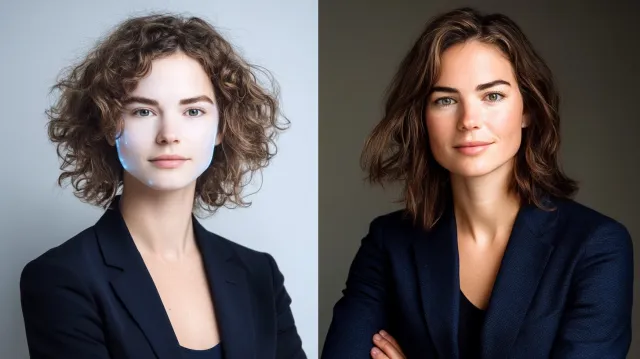
AI headshot generators (Aragon, HeadshotPro, BetterPic) produce passable thumbnails but fail at LinkedIn's specific scale and trust requirements.
Chris McCarthy
Professional Photographer, Photography Shark · May 10, 2026 · Updated May 23, 2026
This post is specifically about whether AI headshot generators work as LinkedIn primary photos. The answer is meaningfully different from the answer for general professional headshot use — LinkedIn's circle-crop thumbnail scale, the recruiter-class viewer audience, and the platform's specific algorithmic surface combine to make AI headshots actively counterproductive on LinkedIn in 2026, even when they'd be acceptable elsewhere. For the general comparison framework — when AI is fine, when you need a human photographer, pricing comparison across the market — see AI headshots vs professional headshots: when each makes sense in 2026.
In my experience shooting headshots across Boston and the South Shore, the details that matter most are rarely the ones clients worry about.
The LinkedIn Detection Problem Is Worse Than General Detection
The 2024 Pew Research finding that 64% of US adults can identify AI-generated images understates the problem for LinkedIn specifically. The LinkedIn-active user base — recruiters, hiring managers, sales professionals, business development teams, executive search firms — reviews profile photos at a rate of hundreds per week. They develop pattern recognition for the visual tells of AI generation that general users don't.
Recruiter detection rates measured in late-2024 industry surveys ran 85–92% on AI primaries that had not been hand-edited by a retoucher to remove the most obvious tells. The detection rates against AI primaries that had been touched up by a human dropped to ~60% — still above the "this is invisible" threshold most users assume their AI photo achieves.
The takeaway: the average LinkedIn primary is being viewed by an audience with substantially above-average AI-detection skill. The detection failure mode that makes you "look normal" to your friends on Instagram doesn't apply to the same image on LinkedIn.
The Six Specific Tells LinkedIn Viewers Spot
These are the tells that come up most often in recruiter-survey free-response data about why a LinkedIn primary "looked AI":
- Eye asymmetry that doesn't match natural bilateral facial structure. Human eyes are subtly different sizes, with the asymmetry showing up in lid position, lash density, and pupil placement. AI tools generate asymmetric eyes that don't match each other in the way real eye asymmetries do.
- Skin texture that reads as smoothed plastic. Even with the 2026-era improvements, AI skin has a characteristic uniform smoothness at LinkedIn's thumbnail scale that real skin doesn't. The variations of pore density, light reflectance, and color across the face are subtly off.
- Fused jewelry and clothing edges. AI tools still struggle with the precise edge interaction between earrings and ear lobes, between necklace clasps and skin, between collar lines and necks. At thumbnail scale these fuse in ways that read as "off" without the viewer being able to articulate why.
- Hair texture inconsistency. Hair generated by AI tools has subtle artifacts — too-uniform strands in some areas, "noise" patterns in others, lighting that doesn't match a single coherent light source on the hair specifically.
- The single-light-source incoherence. Real headshots have a primary light source whose direction can be inferred from shadow patterns across the face. AI headshots frequently have shadow patterns suggesting multiple light sources or no coherent source at all.
- The "AI face" that looks vaguely like a different person. Across 10 AI-generated images of the same person, the face drifts subtly from one image to the next. On LinkedIn, the primary tends to be the most flattering of the set — which means it's also the one that looks least like the person. A viewer who later sees the person in a video call or photo with colleagues immediately registers the mismatch.
Why Circle-Crop Thumbnail Scale Makes It Worse
LinkedIn presents profile photos as circle-cropped thumbnails at 56–112 pixels in the desktop feed, search results, and connection lists. The circle crop removes background context, which is where some AI tells normally hide. The small scale forces specific features to carry disproportionate visual weight — eyes, mouth, and central skin tone occupy more relative area than they do in a full-size headshot.
Counterintuitively, AI headshots that look acceptable at larger sizes often look worse at thumbnail scale because the tells become more concentrated. The opposite is true of professional photography: a strong professional headshot reads as strong at every scale from thumbnail to billboard, because the underlying lighting and direction are calibrated for visual coherence across scales.
The Response-Rate Hit Recruiters Apply
The conversion data on AI-flagged LinkedIn primaries comes from several recruiter-side studies through late 2024 and early 2025:
- InMail response rates: 30–50% lower for profiles with AI-flagged primaries vs profiles with professional photography
- Profile click-through from search results: 20–35% lower
- Hiring-manager trust ratings: AI-flagged profiles rated 1.5–2.0 points lower on a 10-point trust scale in blind comparison tests
- Time-to-response on cold outreach: 2–3x longer for AI-flagged profiles when responses came at all
The recruiter perspective driving these numbers is consistent: an AI-flagged LinkedIn primary signals either inability to invest in basic professional infrastructure (a flag for senior roles), willingness to misrepresent (a flag for any role involving trust), or unfamiliarity with current professional norms (a flag for client-facing or executive work). None of these signals help the candidate or the salesperson sending the InMail.
When AI Headshots Are Genuinely Acceptable for LinkedIn
There are narrow cases where the cost-benefit math actually favors AI for a LinkedIn primary:
- Bridge period while a professional session is being scheduled. Booking lead times for good Boston photographers run 2-4 weeks. An AI image during that window is fine — and explicitly labeled as a placeholder in some users' headlines makes it even less risky.
- Profiles that aren't being used for job search, business development, or sales prospecting. A LinkedIn account that exists for industry-news consumption but doesn't actively receive inbound contact can run an AI primary without measurable cost.
- Cases where the alternative is no profile photo at all. A LinkedIn profile with no photo gets 20–30% fewer InMail responses than one with even a mediocre photo. An AI primary beats blank.
- Very early-career profiles where the headshot's primary job is "exists" rather than "communicates seniority." Recent graduates and early-career professionals can run an AI primary if a real session isn't financially feasible yet — though even a $200 entry-tier professional session is usually accessible.
For LinkedIn primaries doing real career work — senior role search, sales prospecting, fundraising, client acquisition, media outreach, public speaking — professional photography remains the standard, and the cost difference between AI ($30–$60) and professional ($300–$800) is consistently outweighed by the conversion difference. The math is even more decisive than it is for general professional headshot use.
The Broader Comparison Context
The companion post on AI headshots vs professional headshots: when each makes sense in 2026 covers the general framework — pricing comparison across the market, the decision matrix for non-LinkedIn use cases, what AI tools have improved at, and the hybrid pre-visualization use case. For LinkedIn specifically, the bottom line is harder: the platform's audience and scale make AI headshots actively counterproductive in ways that don't apply to general professional headshot use.
If LinkedIn is the primary surface your headshot serves and you've been weighing the AI option, the recommendation is to book a professional session. The cost-per-month over an 18-month photo lifespan works out to about $22 for a $395 professional shoot — meaningfully less than the cost of a single InMail response missed because of an AI-flagged profile. The LinkedIn profile photo guide covers the exact dimensions, display sizes, and optimization steps to get the most out of your professional headshot once it is uploaded. See LinkedIn headshots in Boston for the platform-specific session calibrated for the circular thumbnail crop LinkedIn actually displays. Also relevant: interview headshot specs and tips.
Frequently Asked Questions
Are AI headshot generators worth it for LinkedIn?
No, in nearly every case. AI-generated headshots produce passable images at low resolution but consistently fail at LinkedIn's circle-crop thumbnail scale, where AI artifacts — uneven eye geometry, glassy skin texture, fused jewelry, and the "AI face" tells — become immediately recognizable. A 2024 Pew Research survey found 64% of US adults can identify AI-generated images; among LinkedIn-active users (recruiters, hiring managers, sales professionals), that detection rate is meaningfully higher. The cost savings versus a professional session ($30–$60 vs $300–$800) is real, but the cost of an AI-detectable LinkedIn primary is a reduced first-impression credibility score that recruiters and prospects apply silently and consistently.
Can recruiters and hiring managers detect AI headshots?
Yes, more often than not. Recruiters review hundreds of LinkedIn profiles per week and develop strong pattern recognition for the visual tells of AI generation. The most reliable tells: skin texture that reads as smoothed-plastic, slight eye asymmetry that doesn't match real bilateral facial structure, jewelry or clothing that fuses with skin in subtle ways, hair textures that show characteristic AI "noise," and lighting that doesn't match a single coherent light source. Recruiter-survey data from late 2024 onward shows AI-detected profiles get materially fewer responses and lower trust ratings.
Are AI headshots ever acceptable on LinkedIn?
In two narrow cases. First, as a temporary placeholder while a professional session is being scheduled — typical bridge period of 1–4 weeks. Second, for casual or non-client-facing professional contexts where the LinkedIn profile is not a meaningful career surface (e.g., a hobbyist account, a profile not used for job search or business development). For LinkedIn primaries that touch job searching, sales prospecting, fundraising, client acquisition, or media outreach, professional photography is the standard.
What about the AI headshots my friend got — they look great?
Two things are usually true. First, the friend is seeing the image at a particular size (their phone screen, social-feed scale) where AI artifacts are not visible. At LinkedIn's circle-crop thumbnail scale on a desktop browser, different tells become visible. Second, AI tools have a high variance — one in every dozen or so generations looks genuinely passable, and that's the one the friend picked. The problem is that recruiters and prospects will see other thumbnails from the same generation set if the friend posts content with multiple AI photos, and inconsistency between "passable" and "obviously AI" tells the story.
How much does a real LinkedIn headshot cost?
A professional LinkedIn headshot session in the Boston market typically costs $300–$800. Photography Shark studio sessions are $395 and include 30–60 minutes of shooting, multiple wardrobe options, 10 fully retouched high-resolution images, and full commercial use rights — meaning the same files work across LinkedIn, your company website, press kits, podcast appearances, and speaker bios. Cost-per-use across a 2–3 year photo lifespan is meaningfully lower than the $30–$60 AI tools when factoring conversion outcomes.
Related Posts


You Might Also Like
About the Author
Chris McCarthy
Chris McCarthy has run Photography Shark Studios in Rockland, MA for over 10 years and 500+ sessions, with executive headshot work for Rockland Trust, Clean Harbors, M&T Bank, and McCarthy Planning; founder portraits for AI startups including Lowtouch.ai; product photography for South Shore brands like Lauren's Swim; and headshots across South Shore legal, medical, financial, and academic practices. Every session is personally shot and edited by Chris on Sony mirrorless and Godox strobe systems — no assistants, no outsourcing, no batch retouching. Galleries deliver in 3–5 business days. About photographer Chris McCarthy →
Photography Shark · Boston & South Shore MA
Ready to Book a Session?
Professional headshots, senior portraits, boudoir, and model portfolios. Studio in Rockland, MA — 25 miles south of Boston. Sessions from $395.