Headshots
Professional Headshot Backgrounds: Colors, Types, and What Works in 2026
How to choose the right professional headshot background — color comparison (white, gray, black, colored), industry conventions, LinkedIn thumbnail considerations, DIY vs studio, and common background mistakes.
Chris McCarthy
Professional Photographer, Photography Shark · April 15, 2026 · Updated May 27, 2026
Background choice is the second-biggest variable in a professional headshot — the first being framing. The right headshot background reinforces the message of the photograph; the wrong one undermines it. Most clients focus on wardrobe and expression (both correctly) and treat background as an afterthought, which is often how they end up with images that don't match the platform they need them for.
I have photographed headshots for every industry represented on the South Shore, and the preparation questions are remarkably similar: What background color should I choose? Does it matter? Will it look professional? The answer to all three is yes, it matters more than most people expect, and this guide covers every major option.
How Background Choice Actually Affects the Image
A headshot background does three things:
- Sets emotional tone. Dark = serious, stable, authoritative. Light = approachable, modern, open. Mid-tone = neutral, doesn't compete.
- Affects subject contrast. A subject in a navy suit on a navy background loses shoulder definition. The background needs to create separation.
- Determines reproduction range. A high-contrast subject on a light background prints well at any size. A dark-on-dark image can disappear at thumbnail scale.
A good background choice isn't about aesthetic preference. It's about where the image will actually be seen and what signal it needs to send when it gets there. The wrong background can sink an otherwise strong headshot. The right one reinforces it without being noticed.
Headshot Background Color Comparison
| Background | Color reads as | Best industries | LinkedIn-ready | Notes |
|---|---|---|---|---|
| White seamless | Clean, modern, bright | LinkedIn, tech, healthcare, modern professional | Yes | Can wash out pale subjects without careful lighting |
| Cream / off-white | Warm, approachable | Authors, speakers, hospitality, soft professional | Yes | Flatters most skin tones; less stark than pure white |
| Light gray | Neutral, modern | LinkedIn, tech, general professional | Yes | Highest "doesn't compete" rating |
| Warm gray | Approachable neutral | LinkedIn, healthcare, education | Yes | Works across more skin tones than cool gray |
| Medium gray | Neutral, classic | Actor headshots, casting, neutral pro | With good contrast | The casting/acting industry standard |
| Charcoal | Authoritative, stable | Executive, finance, legal | Tighter crop needed | Adds gravitas; pair with darker wardrobe |
| Black | Dramatic, premium | Executive, editorial, premium brand | Avoid for primary | Disappears at thumbnail; needs careful lighting |
| Navy | Dignified, corporate | Corporate, legal, finance | With contrast | Reads as more formal than gray |
| Muted blue | Trust, competence | Financial services, personal brands, speakers | Yes | Photographs well for warmth + authority |
| Sage green | Calm, grounded | Therapists, wellness, coaches, creatives | Yes | Works against most skin tones |
| Warm beige / sand | Approachable, humanizing | Lifestyle branding, soft professional | Yes | Less corporate feel |
| Deep navy / burgundy | Traditional, prestigious | Legal, financial, executive | With contrast | Institutional weight desired |
| Bright saturated (yellow, red, teal) | Creative, brand-forward | Brand-specific use only | Variable | Powerful when use case fits; risky as default |
| Brick / textured | Character, creative | Boutique brand, creative, hospitality | Variable | Can date quickly; harder to crop |
| Bookshelf / office | Environmental, contextual | Authors, academics, consultants | Distracting | Often too busy for true headshot work |
| Outdoor (greenery/urban) | Lifestyle, environmental | Environmental portraits | Not a headshot | Crosses into portrait territory |
Headshot Background Colors: What Each One Communicates
Background color is read by viewers as part of the photograph's message — usually pre-consciously. The signal each color sends has been studied enough that the patterns are predictable. The full breakdown of headshot background colors goes further on how each shade reads by industry.
White Backgrounds
White backgrounds read clean, modern, and slightly clinical. They work well for corporate websites with minimalist designs, medical and healthcare contexts, and anyone whose branding leans toward "clean and straightforward."
The downside: white backgrounds can feel cold if the lighting isn't handled correctly, and they demand perfect wardrobe. Any visible stray thread, wrinkle, or lint shows up more on white than on darker backgrounds. They also push a lot of responsibility onto expression — with no atmosphere from the background, the subject's face is doing all the work.
Best for: corporate websites, press releases, medical profiles, anyone needing a very clean institutional feel.
Gray Backgrounds
Gray — specifically a medium-light gray — is the most versatile background in professional headshot work. It reads neutrally across industries, handles web page designs from dark mode to light, compresses well on LinkedIn, and doesn't date.
The reason gray is the default for so many LinkedIn headshots is that it works: recruiters and viewers can focus on the face without the background sending a specific signal. It's the "safe, not boring" choice.
Within gray, there's a spectrum worth understanding:
- Light gray (60-70% reflectivity) signals professional but human. The most-used background in corporate headshot work because it borrows authority from the institutional palette without going as cold as white. Works across LinkedIn, firm bios, and most professional directories.
- Mid gray (40-50% reflectivity) signals seriousness and gravity. Appears more in editorial photography, executive portraits for annual reports, and book jacket photography. Slightly more dramatic than light gray; less reductive than black.
- Charcoal and dark gray (15-30% reflectivity) signal authority and weight. Used for executive and C-suite portraits, legal partner photography, and editorial business publication work. Can feel heavy if the subject's wardrobe and expression don't balance it.
Best for: LinkedIn profiles, executive headshots, anyone who needs one image that works across many contexts.
Black Backgrounds
Black backgrounds produce the most dramatic headshots. They work especially well for actors, authors, creatives, musicians, and personal brands that benefit from a more editorial feel.
The trade-off is specificity. A black-background headshot sends a clear signal — confident, deliberate, often creative — and that signal either fits the context or it doesn't. Using a black-background headshot for a conservative corporate role can read as off-key.
Black backgrounds also interact with wardrobe in a specific way: dark clothing disappears into the background, which can either be a strength (letting the face dominate) or a weakness (making the subject look disembodied). Wardrobe choices for black-background headshots usually skew toward mid-tone or lighter pieces.
Best for: actor headshots, author photos, creative personal branding, editorial contexts.
Colored Backgrounds
Muted colored backgrounds have become much more common in the last few years, driven partly by personal branding and partly by platforms where standing out from a sea of gray images matters.
Deep blues, sage greens, warm beiges, and soft pastels can all work — when they're chosen deliberately and the client's wardrobe, skin tone, and intended use align with the choice. A deep blue background can feel elevated and professional; a bright yellow can feel creative and approachable. The common mistake is picking a color because the client likes it without thinking about whether the image will actually work where it's being used.
Colored backgrounds demand more thought at the consultation stage. Wardrobe needs to complement the background without clashing. Skin tones interact with background color in ways that aren't obvious in advance — warm-toned skin against a warm background can flatten; cool skin against a saturated warm background can create tension.
Best for: personal brands, creative industries, speakers and coaches, anyone who wants their headshot to feel less generic.
The Color Science Behind Headshot Backgrounds
The reason some background choices feel "off" even when the wardrobe and expression are dialed in usually traces back to one of three measurable color science variables. Understanding them lets you make a deliberate choice rather than picking by gut.
Color temperature mismatch. Studio strobes — in my case Godox AD600Pro packs firing through softboxes and umbrellas — output light at approximately 5500K daylight balance. The seamless paper backdrops are manufactured under that standard. When a client photographs better against one gray than another, the issue is often that one paper is slightly warmer (leaning yellow at around 5300K under flash) and the other is slightly cooler (leaning blue at around 5700K). Skin reads warmer against cool gray and cooler against warm gray. Pale skin generally photographs better against slightly warmer rolls; medium and deeper skin tones often look richer against a slightly cooler gray.
Reflectivity and the "background spill" problem. White seamless paper reflects light back into the subject — sometimes dramatically. A subject standing 4 feet from a brightly lit white background will get a noticeable cool fill on the back of the hair and shoulders. This is invisible to most clients but fights the lighting of the face. We position subjects 6-8 feet off the backdrop for white sessions to control this. Black paper has the opposite problem — it absorbs light, which is why the face needs more deliberate lighting to separate from the void behind.
Hue interaction with skin undertone. Warm-undertone skin (yellow-olive, golden) photographs flat against warm backgrounds (beige, terracotta, warm gray) and pops against cool backgrounds (blue-gray, deep navy, sage). Cool-undertone skin (pink, rosy, neutral) does the inverse — pops against warm backgrounds and can feel washed out against blue-gray. This is why a single "best" colored backdrop does not exist; it depends on the subject in front of it.
In a 60-90 minute session at the Rockland studio we test multiple variants live on a calibrated monitor before committing to extended shooting. The client sees the difference immediately when the comparison is on screen rather than imagined.
What Color Background Photographs Best for Different Skin Tones
A practical detail rarely covered: background color interacts with skin tone, and some pairings flatter while others fight.
| Skin tone | Backgrounds that flatter | Backgrounds to avoid |
|---|---|---|
| Very pale | Warm gray, cream, soft beige | Pure white (washes out), pure black (high contrast can be harsh) |
| Light | Most options work | Same-tone wardrobe-background pairings |
| Medium | Most options work | Pure white can lose dimension on the face |
| Olive | Warm gray, charcoal, navy, cream | Cool blue (color cast clash) |
| Tan | White, warm gray, navy, charcoal | Yellow-green (clash with warm undertones) |
| Brown | Charcoal, white, warm gray, navy | Mid-brown (low separation) |
| Deep | Light backgrounds for separation | Dark backgrounds without strong rim/edge lighting |
A skilled photographer adjusts lighting to make background-skin combinations work, but the wrong combination requires more correction in post and the result rarely looks as natural as a good pairing from the start.
By Use Case: Matching Background to Purpose
The use case is the simplest filter for choosing your headshot background. Here's how to think about each:
LinkedIn Primary Photo
LinkedIn displays profile photos as small circles. The thumbnail needs to read clearly at roughly 80 pixels. Implications:
- High contrast between subject and background is critical. Avoid same-tone-as-clothing backgrounds.
- Light-to-mid backgrounds outperform dark. The face needs to be the brightest thing in the circle.
- Clean and uncluttered. Texture, brick, or busy outdoor backgrounds add noise that reads as visual chaos at thumbnail scale.
Best LinkedIn background categories: white, cream, light gray, warm gray, soft blue. LinkedIn also compresses heavily, so clean backgrounds that survive compression outperform textured or gradient options.
Executive and Legal
Executive headshots emphasize stability and authority. Implications:
- Darker backgrounds reinforce the signal. Charcoal, deep gray, navy, or black.
- Pair with darker wardrobe. A subject in a navy suit on a charcoal background works; on white it can read as too casual.
- Some firms mandate background. Check before booking — many firms have a specific brand background for partner photos.
Firm bio for law, finance, accounting: match the firm's spec or default to the firm's palette. If no spec, mid-light gray.
Actor and Casting
Casting industry default is medium gray. The reasoning is functional:
- Medium gray doesn't compete with the face. Casting directors evaluate the face, not the photograph.
- Multiple lighting setups read clearly against gray. Lighting carries the image, not the background.
- The 8x10 crop is industry-standard. Backgrounds that distract from the face fail this format.
For actor headshots specifically, the answer is essentially always medium gray (or occasionally a darker variant for theatrical) plus a lighter background option (cream or warm white) for commercial. The commercial headshot typically goes lighter, often with a hint of warmth — the audition reader should read approachability immediately. The market matters too: Boston and New York skew toward muted gray or natural environment; LA more often allows lighter or colored backgrounds. We discuss based on the agent or casting target. See actor headshots Boston for the format-specific breakdown.
Healthcare and Therapy
Healthcare emphasizes approachability without losing professionalism. Implications:
- Light backgrounds dominate. Cream, soft gray, soft blue.
- Avoid stark white. Reads as clinical/cold.
- Hospital or clinical directory: white or near-white per most hospital system standards. Confirm with your communications coordinator.
Tech and Startup
Tech has shifted dramatically toward bright, casual aesthetics over the past decade. Implications:
- White and light gray dominate. Cleaner, more modern.
- Sometimes outdoor or environmental for founder profiles; mostly studio for headshot proper.
- Often paired with environmental shots in the same session for press kit use.
Speakers and Personal Brands
Deliberate color often outperforms gray here. The headshot lives next to other speakers' gray-background photos and benefits from differentiation. Muted blue, sage, or a tone that matches the personal brand palette all work.
Author and Book Jacket
Black or deep gray for literary fiction and serious nonfiction; lighter and warmer for business books, self-help, and lifestyle.
Modeling Agency Submission
Clean white or light gray, no styling. Agencies want to evaluate the face without distraction.
Dating Profile
Soft natural environment if shot on location, or warm light gray if shot in studio. Avoid the institutional look entirely.
Internal Corporate Directory
Match the existing team page. Consistency over distinction.
Studio vs Outdoor Backgrounds — When Each Works
Photography Shark is a studio specialist. The reasoning behind preferring studio for true headshots:
- Lighting control. Strobe-based studio lighting produces consistent, flattering results regardless of weather, time of day, or season.
- Background uniformity. Multiple backdrops available; client can choose what fits the use case.
- Reproducibility. A team session shot in studio looks consistent across team members. Outdoor sessions vary by where each person stood.
- Privacy and comfort. Closed-set studio is calmer for nervous clients than a public outdoor setting.
When outdoor backgrounds make sense:
- Environmental portraits (where the location is part of the message — a chef in their kitchen, a scientist in their lab).
- Lifestyle imagery for personal-brand or hospitality contexts.
- Founder/executive press kits where multiple settings are needed.
When outdoor backgrounds don't work:
- Pure professional headshots for LinkedIn, casting, directories, business cards.
- Multi-person team headshots that need consistency.
- Use cases where reproduction quality matters (print, billboards, signage).
For outdoor portrait work specifically, the southshorephotography.com companion brand handles that side of the practice. Photography Shark is studio-only.
DIY Backgrounds vs Professional Studio Backgrounds
A common question in 2026, given that remote work has normalized "good-enough" self-shot headshots: can you get a professional-looking background at home?
DIY approaches that can work (barely):
- Plain painted wall in a neutral color with directional window light. Requires: an uncluttered wall, good natural light, and careful positioning. Limitations: no ability to swap backgrounds, light quality varies by time of day, and color accuracy depends entirely on the wall paint.
- Collapsible fabric backdrops (the pop-up kind available online for under $40). Produces visible wrinkles that are extremely difficult to remove in post. These scream "I set this up in my living room" to anyone who sees professional headshots regularly.
- Virtual backgrounds or AI replacement. Increasingly common and increasingly detectable. The edge masking around hair is almost always wrong, and the lighting on the subject doesn't match the lighting implied by the background. Fine for a Zoom call; not fine for a permanent headshot.
Why studio backgrounds are different:
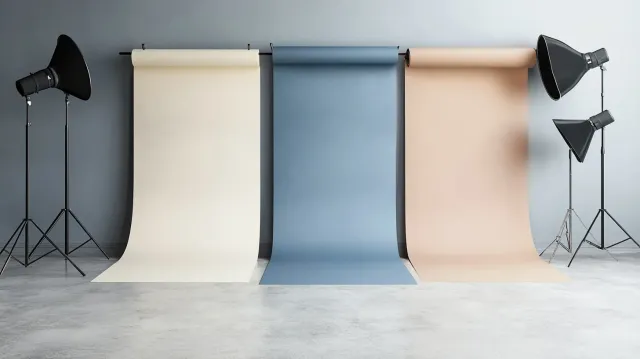
- Seamless paper is manufactured to be perfectly uniform in color and texture. A 9-foot roll of Savage seamless paper on a crossbar system creates a background that extends smoothly from the wall behind the subject down to the floor, eliminating the horizon line entirely.
- Lighting the background separately from the subject allows precise control over tone — the same gray paper can read as light gray or dark gray depending on how much light hits it. This is why a studio with three gray rolls can produce a dozen different "gray background" looks.
- Distance between subject and background (typically 6-8 feet in our studio) allows the background to fall naturally out of focus, creating a clean separation that is impossible when someone is standing 18 inches from a wall.
If the headshot matters — LinkedIn, business cards, a firm bio page, casting submissions — the DIY approach costs you more in lost professional signal than you save in session fees. If the headshot is for a quick internal directory update that 12 people will see, DIY might be fine.
Mixing Backgrounds in One Session
Most sessions at the studio include at least two background options. This isn't upselling — it's recognizing that clients often need images for different contexts, and locking into a single background can leave you underserved.
A common combination:
- Medium gray for LinkedIn and the main website
- Black for editorial use or bio pages that need more drama
- One colored option (often a muted blue or green) for social media where the gray-background norm is visually exhausting
The 30-minute studio package includes two backgrounds. Longer sessions accommodate three. Choices are discussed during the consultation so lighting can be set up appropriately for each — different backgrounds require different lighting adjustments, and this is part of what takes session time.
Common Headshot Background Mistakes
These are the background errors I see most often when clients bring in headshots they've gotten elsewhere or shot themselves:
- Matching wardrobe to background. A navy blazer on a navy background eliminates the shoulder line entirely. The subject looks like a floating head.
- Too close to the background. Standing two feet from a wall creates harsh shadows behind the subject and makes the background texture visible. Professional studio distance is 6-8 feet minimum.
- Busy environment behind the subject. A bookshelf, office plants, or window blinds might seem "real" but they compete for attention. The background should be subordinate to the face.
- Wrong background for the platform. A dramatic black background that looks stunning at full size can make the subject's face disappear in a LinkedIn thumbnail circle. Always consider the end use.
- Trendy color that dates immediately. That coral/millennial pink backdrop looked distinctive in 2021. By 2024 it looked dated. Neutrals age better.
- Green screen compositing for a permanent headshot. AI and compositing tools are improving but the edge quality around hair still gives it away. Real backgrounds remain the standard for professional use.
- Wrinkled fabric or muslin. Wrinkles are essentially impossible to fully remove in post-processing. They broadcast "temporary setup" immediately.
Background Trends to Watch in 2026
A few patterns worth knowing about:
- Brick and exposed-texture backgrounds are dating. They were popular 2018-2022 in tech and creative; they now read as dated. Use sparingly.
- Solid color backgrounds (sage green, navy, deep burgundy) are appearing more in editorial and personal-brand work. Risk: trends date faster than neutrals.
- AI-generated backgrounds are being added to AI headshot tools. These are typically detectable and read as off in subtle ways. Real backgrounds remain the standard for professional use.
- Natural, warm tones (sand, warm beige, soft terracotta) are gaining ground in lifestyle-adjacent professional contexts. They work for coaches, wellness practitioners, and personal brands that want warmth without going full outdoor.
How to Choose for Your Specific Headshot
Three questions to answer before your Boston headshot session:
- What is the headshot for? LinkedIn, light. Executive directory, mid-to-dark. Actor casting, medium gray. Press kit, multiple options.
- What does your existing professional photography look like? If your firm has a consistent background across leadership headshots, match it. Inconsistency reads as off.
- What are you wearing? Background should contrast with wardrobe enough to define the silhouette. Pre-session wardrobe consultation handles this — see what to wear for a professional headshot.
At Photography Shark, the background choice is part of the consultation. The studio has white seamless, multiple gray and charcoal seamless options, navy, and a brick wall available. Most sessions cover 2-3 background options across the wardrobe changes.
The Default Recommendation
If you're booking a session and unsure, the standard recommendation is: medium-light gray plus one other option. Gray for the primary use; the second option for variety. You'll get images that work across platforms and won't feel locked into a single aesthetic.
Ready to Book?
Get in touch to schedule. Sessions are in Rockland, MA, 25 minutes south of Boston. Multiple backdrop options included in every session.
Related reading: Professional headshot examples · What to wear for a professional headshot · Tips for professional headshots · LinkedIn headshots Boston · Boston headshots
Frequently Asked Questions
What is the best background for a professional headshot?
For most use cases, a neutral mid-tone background (warm gray, charcoal, or off-white) is the safest choice. It works for LinkedIn, corporate directories, press kits, and business cards across most industries. Industry calibration matters — finance and legal lean darker; tech and healthcare lean lighter. There is no single "best" answer; the right background depends on what the headshot is for.
What's the most versatile headshot background color?
A medium-light gray. It reads cleanly on LinkedIn and websites, holds up on dark and light web page designs, and doesn't date as quickly as trendier color backgrounds. If you can only pick one, pick medium gray.
Should my headshot have a white background?
White seamless backgrounds work well for LinkedIn headshots, healthcare, tech, and modern professional contexts where bright, clean energy is the goal. They can wash out very pale subjects without careful lighting and can read as too informal for legal or executive contexts. White is the most LinkedIn-friendly background but is not universally appropriate.
Is a black background appropriate for a headshot?
Black backgrounds are appropriate for executive, legal, and editorial headshots where gravitas is the signal. They are dramatic and require careful lighting to keep the subject from blending in. Avoid black for LinkedIn primaries (low contrast at thumbnail scale) and most casual professional contexts.
What background color is best for LinkedIn?
Light to mid-tone backgrounds (white, cream, light gray, soft blue, warm gray) are best for LinkedIn because they create the contrast needed for the small circular thumbnail. Avoid very dark backgrounds for LinkedIn primaries — at thumbnail scale, the face can disappear into the background.
Can I shoot on a colored background for a headshot?
Yes, and it's more common now than it used to be. Muted blues, deep greens, warm beiges, and soft pastels can work well for personal branding, creative industries, and anyone who wants to stand out from a sea of gray-background headshots. They're riskier for traditional corporate settings.
Are outdoor backgrounds professional?
Outdoor backgrounds (trees, brick walls, urban streetscape) work for lifestyle, environmental, and creative-industry headshots. They are less appropriate for traditional executive, legal, finance, or actor headshots. Outdoor work shifts the photograph from "headshot" to "environmental portrait" — a different category. Photography Shark is a studio specialist; outdoor portrait work is handled by the companion brand at southshorephotography.com.
Do different platforms have different background requirements?
LinkedIn compresses heavily and favors clean backgrounds that survive compression. Print materials can handle more texture and color. Video platforms (Zoom, conference sites) usually want high-contrast separation between the subject and background. The choice depends on where the image will be used most.
How many background options do you shoot in a session?
Studio headshot sessions at Photography Shark typically include 2 background choices in the 30-minute package and up to 3 in the longer sessions. The choices are discussed during the consultation so lighting and wardrobe can be matched appropriately.
Related Posts


![What to Wear for a Professional Headshot: Complete Guide [2026]](/blog/what-to-wear-for-a-professional-headshot---boston--hero-w640.webp)
You Might Also Like
About the Author
Chris McCarthy
Chris McCarthy has run Photography Shark Studios in Rockland, MA for over 10 years and 500+ sessions, with executive headshot work for Rockland Trust, Clean Harbors, M&T Bank, and McCarthy Planning; founder portraits for AI startups including Lowtouch.ai; product photography for South Shore brands like Lauren's Swim; and headshots across South Shore legal, medical, financial, and academic practices. Every session is personally shot and edited by Chris on Sony mirrorless and Godox strobe systems — no assistants, no outsourcing, no batch retouching. Galleries deliver in 3–5 business days. About photographer Chris McCarthy →
Photography Shark · Boston & South Shore MA
Ready to Book a Session?
Professional headshots, senior portraits, boudoir, and model portfolios. Studio in Rockland, MA — 25 miles south of Boston. Sessions from $395.