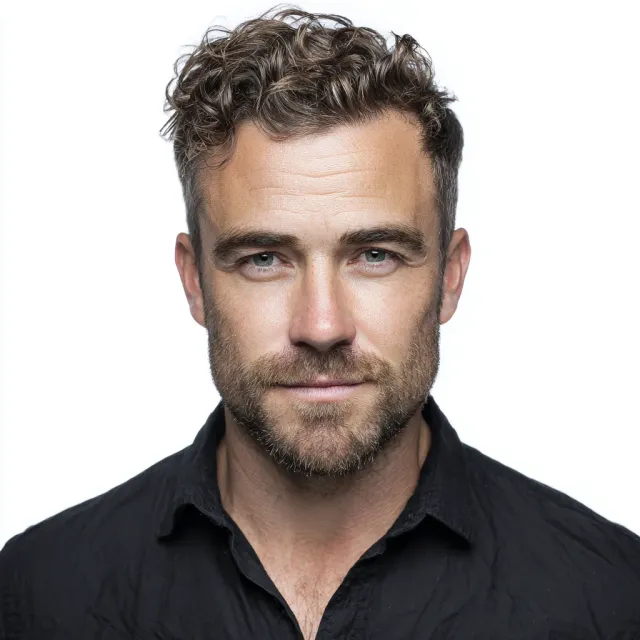
Headshots
How to Use Headshots Effectively on Social Media
How to optimize your professional headshot for LinkedIn, Instagram, and company websites — platform specs, cropping, and what each audience expects.
Chris McCarthy
Professional Photographer, Photography Shark · December 1, 2024 · Updated November 2, 2025
Your profile photo is the first thing someone sees when they land on your LinkedIn page, find your Instagram, or look you up on your company's website. It appears before they read a single word you've written. Before they know your title, your credentials, or your work history. In that fraction of a second, they're already forming an impression.
Most people underestimate how much work that one image is doing. The difference between a great headshot and a mediocre one isn't just aesthetic — it determines whether someone clicks into your profile or moves on, whether they send you that inquiry or send it to a competitor whose photo communicated something yours didn't. For professionals on the South Shore and in Boston who depend on their reputation and visibility, a professional headshot is not a luxury. It's a basic infrastructure investment — and one Chris McCarthy has been making for clients out of the Photography Shark studio in Rockland since 2019.
Here's how to make that investment work.
Understand the Platform Before You Upload
Different social platforms have different visual conventions, different audiences, and different technical requirements. A photo that performs well in one context may perform poorly in another — not because the photo is bad, but because it's not calibrated for the platform where it's being used.
LinkedIn: Professional, Accessible, Trustworthy
LinkedIn is the most consequential platform for a professional headshot because the audience is explicitly professional and the stakes are employment, partnership, and business development. The visual expectations are specific: you should look like you belong in the role you're presenting yourself for.
For LinkedIn headshots:
- Clean, simple backgrounds — a neutral studio background, a well-chosen outdoor setting with background blur, or an environmental shot that's specific to your professional context. Avoid distracting or personal backgrounds that signal you're not treating the platform professionally.
- Professional-appropriate wardrobe — whatever "professional" means in your industry. Attorneys and executives have different norms from designers and entrepreneurs, but both should look deliberate and polished.
- Direct eye contact — looking directly into the camera on LinkedIn signals confidence and engagement, qualities that read as professional trustworthiness.
- A genuine expression — LinkedIn defaulted for years to stiff, corporate, unsmiling headshots. Current best practice is a warm, accessible expression that balances professionalism with approachability. An expression that reads "I'm competent and I'm a pleasant person to work with" consistently outperforms either "poker-faced authority" or "forced grin."
LinkedIn photo dimensions: 400x400 pixels minimum, displays at a small size in most contexts, so the photo should read clearly even at thumbnail scale.
Instagram: Personality, Cohesion, Brand Expression
Instagram is a more visual and personality-forward platform. For professionals, coaches, creatives, and entrepreneurs who use Instagram as a marketing channel, the profile photo serves as a brand anchor — it's small (110x110 pixels in display) but it's the constant visual identifier next to every post and comment.
For Instagram headshots:
- Personality is more important than formality — your Instagram audience is following you because of who you are, not just what you do professionally. Your profile photo should communicate your personality, not just your competence.
- Color and contrast matter at small scale — an Instagram profile photo is displayed very small. High contrast between you and your background helps the photo read clearly even at tiny sizes.
- Cohesion with your overall feed aesthetic — if your Instagram content has a consistent visual style (warm tones, airy light, dark and moody), your profile photo should be roughly cohesive with that palette.
Company Websites and Team Pages
Team page photos are often displayed at consistent sizes in a grid format. Consistency matters here: when every team member's photo has the same general lighting style, background, and framing, the overall page communicates organizational cohesion and professionalism. When headshots are a hodgepodge of different lighting styles, backgrounds, and orientations, the page looks disorganized even if the individual photos are technically good.
If your organization is updating team photos, coordinate them. A single session with a consistent setup for all team members produces dramatically better results than seven individually shot photos from different eras and contexts. Our Boston headshots packages can accommodate team sessions with consistent lighting and background setup for every team member.
Cropping and Technical Specifications
Professional photographers deliver high-resolution files that can be cropped and resized for multiple platforms. Here's how to think about cropping:
For LinkedIn: A tight crop from just above the top of the head to mid-chest or slightly lower. The face should occupy roughly 60-70% of the frame. More than that and the image feels crowded; less than that and your face becomes too small to read at the sizes LinkedIn displays.
For Instagram profile: Square crop, face centered. Because the display is a circle, be aware of what gets cut off in the circular crop — hair or ears near the frame edge may be cropped oddly.
For website "team" photos: Consistent aspect ratio across all photos in the set. If your website displays team photos in a 3:4 portrait ratio, every photo in the set should be cropped to that ratio.
Pixel dimensions: Most professional social media applications require a minimum of 400x400 pixels for profile photos. High-resolution professional headshots (typically 3000+ pixels on the short side) can be cropped and resized for any platform without quality loss. Phone photos often don't have sufficient resolution for all use cases, particularly if the original was taken from a distance and cropped significantly.
Consistency Across Platforms Builds Recognition
One of the most underrated elements of effective headshot strategy is consistency. When your LinkedIn photo, your company website bio photo, your Twitter/X profile, your speaker profile, and your email signature all use the same (or closely related) professional headshot, people who encounter you across platforms immediately recognize you. That recognition builds familiarity, and familiarity builds trust.
When your headshots vary significantly across platforms — a corporate-style photo on LinkedIn, a casual smartphone photo on Instagram, an older photo on your company website — you create a disjointed impression that subtly undermines confidence in your professionalism. You also make it harder for people to connect the dots between your different online presences.
The practical recommendation: once you have a strong headshot, use it everywhere, and update it everywhere at the same time. Set a reminder to audit your photos once a year. A headshot that was current and appropriate two years ago may no longer reflect how you look, what you do, or the professional context you're in.
What Makes a Profile Photo Actually Work
The most effective profile photos share a set of specific qualities that aren't accidental — they're the result of deliberate technical and artistic choices.
Eyes. The eyes are the most important element in any headshot. They should be in sharp focus, and they should look alive — engaged, present, genuinely there. A technically perfect photo with dead or checked-out eyes is a failed headshot. When people feel an immediate connection to a profile photo, it's almost always because the eyes are doing real work.
Expression that matches your brand. A personal injury attorney should probably project empathy and competence rather than ebullience. A business coach whose brand is energy and transformation should probably project warmth and enthusiasm. Match the expression to the professional story you're telling. Neither extreme — humorless rigidity or performative cheerfulness — serves most people well.
Technical quality. Sharp focus (particularly on the eyes and near face), clean exposure, natural color, professional lighting. A photo that's slightly blurry, poorly lit, or oddly colored works against you even if the subject looks great otherwise.
An appropriate setting. The background tells a story about you whether you intend it to or not. A neutral studio background says "professional and focused." An environmental background — your office, an architectural feature, an outdoor setting — says something specific about your context. Whatever your background says, it should be intentional.
When to Update Your Headshot
The practical rule: update your headshot whenever the gap between the photo and how you actually look in person becomes noticeable. If someone would meet you in a professional context and have a moment of "oh, you look different from your photo," it's time.
More specifically:
- After a significant change in appearance (hair length/color, facial hair, weight change, eyewear change)
- When you change professional contexts significantly (new industry, new role, new brand)
- When your current photos are more than three years old (fashion, hair, and photo styles all date in ways you may not notice until you compare)
- When you look at your current headshot and don't feel it represents you well
The cost of a professional headshot session — our Boston headshots packages start at $395 — is modest relative to the professional work that photo will do over the course of one to three years.
Common Headshot Mistakes on Social Media
Using a cropped group photo. Half a torso and an arm visible next to you tells everyone this was not taken for professional purposes. This photo choice signals that you didn't think professional photography was worth your time, which is not the message you want your professional profile to send.
Using a photo from a social event. A photo taken at a wedding, a party, or a vacation — even if you look great in it — signals the wrong context for a professional profile. The background, the lighting, the occasion are all evident, and they undermine the professional impression even if the photo is flattering.
Using a heavily filtered photo. Heavy filter application, face-altering AR effects, and significant skin-smoothing filters produce photos that don't look like the person who shows up in a meeting or on a video call. The disconnect creates a mild but real feeling of having been misled.
Using an outdated photo. The inverse of the above: a photo that accurately represented you five years ago but doesn't now signals either that you don't update your professional materials or that you're hoping no one notices how much has changed. Neither is a strong professional statement.
Different photos on every platform. As discussed above, inconsistency undermines recognition and creates a fragmented professional impression.
Building a Headshot Strategy
For professionals who use photography intentionally as part of their professional brand, a headshot strategy goes beyond a single session:
- A primary professional headshot: Clean, consistent, deployable across all formal professional contexts.
- Secondary/personality-forward images: A slightly more relaxed or expressive photo for Instagram and less formal contexts.
- Environmental photos: Photos that show you in your professional context — your office, a relevant setting, in action doing your work. These are different from headshots but work alongside them to build a complete visual brand.
The South Shore and Boston areas are well-served for professional portrait photography. Photography Shark Studios is based in Rockland and photographs headshots and professional portraits throughout the region — from Plymouth to Quincy, Hingham to Braintree, and into Boston for clients who need city-based sessions.
Ready to Book Your Session?
A great headshot is one of the most effective professional investments you can make. Whether you need images for LinkedIn, your company website, personal branding materials, or actor submissions, Photography Shark Studios delivers professional headshots that work.
Contact us to book your headshot session and let's talk about what you need and what will work best for your platforms and professional goals.
Frequently Asked Questions
What size and format should my LinkedIn headshot be?
LinkedIn displays profile photos at roughly 400x400 pixels minimum, often smaller in search results. Crop from just above the head to mid-chest, with your face occupying 60-70% of the frame. High-resolution files from Photography Shark can be cropped and resized without quality loss.
Should I use the same headshot on LinkedIn and Instagram?
Not necessarily. LinkedIn headshots should prioritize professionalism and direct eye contact. Instagram profile photos are displayed very small (110x110 pixels) and benefit from high contrast between you and your background, plus a personality-forward tone rather than corporate formality.
How do I get consistent headshots for my whole team's website page?
Coordinate a single session with consistent setup — same lighting, same background, same framing — for every team member. Photography Shark's Boston headshots packages accommodate team sessions and produce a cohesive team page rather than a hodgepodge from different eras.
Where is Photography Shark and how much does a headshot session cost?
Photography Shark is at 83 E Water Street, Rockland, MA 02370. Studio sessions start at $395 (30 min, 10 images) — calibrated for South Shore professionals from Hingham, Weymouth, Quincy, Plymouth, and beyond who need headshots that perform across all digital platforms.
Why does my profile photo affect whether people contact me professionally?
Your profile photo appears before anyone reads your credentials. Research shows profiles with professional photos receive significantly more connection requests, message responses, and profile views. The difference between a great headshot and a mediocre one determines whether someone clicks through or moves on.
What is the right expression for a LinkedIn headshot?
Current best practice is a warm, accessible expression that balances professionalism with approachability — neither poker-faced authority nor forced grin. Photography Shark sessions are structured to produce this expression genuinely rather than by asking you to perform it.
Related Posts




You Might Also Like
About the Author
Chris McCarthy
Chris McCarthy has run Photography Shark Studios in Rockland, MA for over 10 years and 500+ sessions, with executive headshot work for Rockland Trust, Clean Harbors, M&T Bank, and McCarthy Planning; founder portraits for AI startups including Lowtouch.ai; product photography for South Shore brands like Lauren's Swim; and headshots across South Shore legal, medical, financial, and academic practices. Every session is personally shot and edited by Chris on Sony mirrorless and Godox strobe systems — no assistants, no outsourcing, no batch retouching. Galleries deliver in 3–5 business days. About Photography Shark →
Photography Shark · Boston & South Shore MA
Ready to Book a Session?
Professional headshots, senior portraits, boudoir, and model portfolios. Studio in Rockland, MA — 25 miles south of Boston. Sessions from $395.